
Library Cards and Accounts
How do I get a DeWitt District Library Card?
Review our Get a Library Card page to get started.
How do I access my account?
Your online account allows you to view items you currently have checked out and on hold, pay fines, change your PIN, set your notification preferences, and sign up for text messaging for holds and due date reminders. Click on the My Account button at the top of any page of our website and enter your library card number and PIN to access your information.
You may also access your account information via the Library Mobile App
What is my PIN?
You selected a 4 digit PIN number at the time of creating your library account. You can change your PIN from your online account. If you need to reset your PIN, please contact the Library.
How much does it cost to use the library?
The majority of our library materials, programs, and services are offered at no cost to library cardholders. Exceptions include special programs that have a fee for materials and our printing and faxing services. We also have headphones available for sale if you need a pair while using a computer or mobile device at the library.
How many books can I check out?
The majority of our library collection has an unlimited number of checkouts with just a few exceptions. Items in our NEW collection are limited to 6 checked out at one time. Also, items from our Library of Things collection may be checked out 2 at one time. Mobile Hotspots may be checked out one at a time, and are able to connect to multiple devices at once!
See our Borrowing Guidelines page for additional information.
Can I place holds on Library materials?
Yes, you can place holds on items that are in our catalog, including items that are currently checked out. We will notify you when the title is ready for pickup. You can place holds online through our catalog or by calling the library for assistance.
See our Borrowing Guidelines page for additional details about holds.
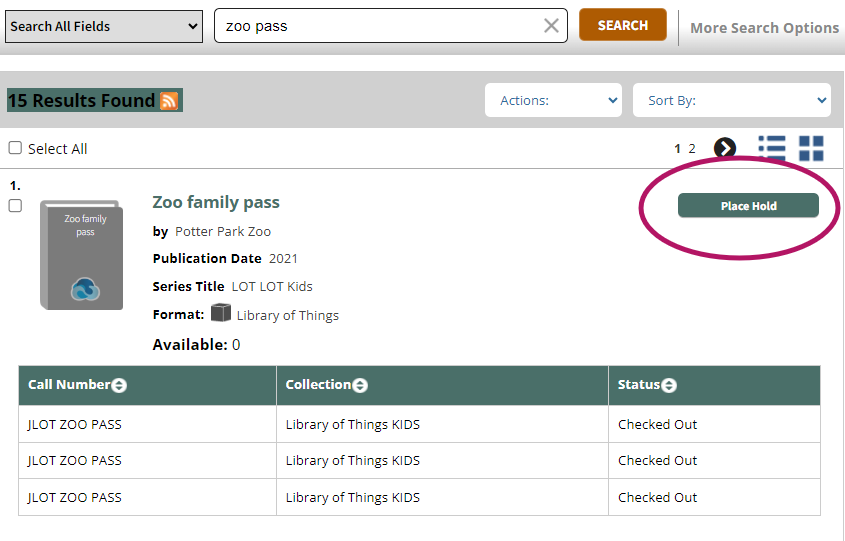
Where are my items on hold kept and for how long?
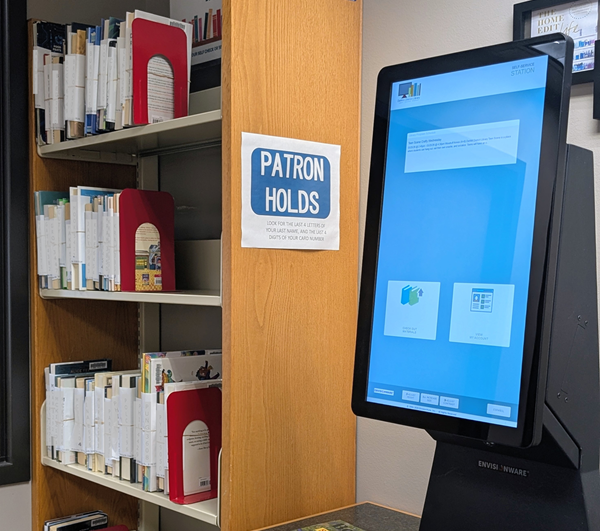
DDL items placed on hold are kept on our public, self-serve Holds shelf located to the left of the Service Desk. We notify you of your available holds via either email, text message, or phone call and then these items are placed on the Hold shelf for 5 library business days. When you are ready to collect your items, simply come into the main library, find your items by the first 4 letters of your last name and the last 4 numbers of your library card. Then use the shelf-checkout kiosk to check them out onto your library account.
How do I renew items checked out on my account?
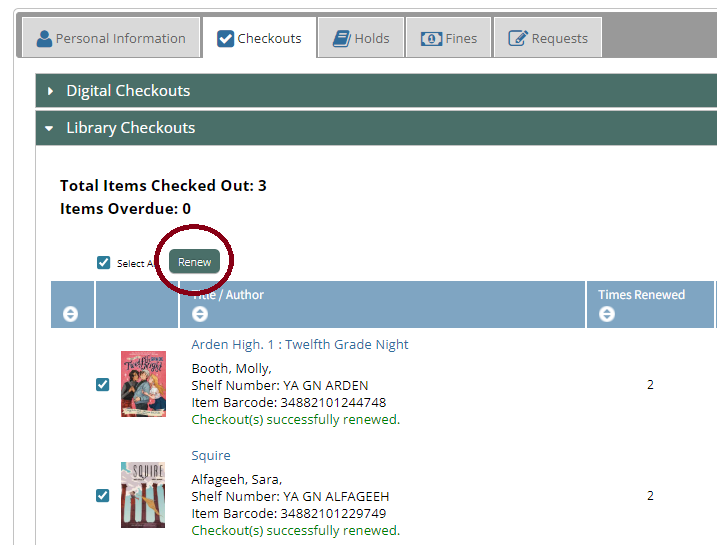
If you have an item checked out, it will automatically renew once (unless there is a hold on the item or the item is ineligible for renewals). You can also request item renewals from your online account or by calling the library for assistance.
See our Borrowing Guidelines page for additional details about renewals.
How do I pay for library fees?
The DeWitt District Library is fine-free for overdue items, so the only fines you will have to pay are on lost or damaged items. Fines can be paid in person via cash, check, or credit card at the Service Desk.
See our Borrowing Guidelines page for additional details about fines and fees.
Library Services
How much does it cost to print?
The cost for both copying and printing documents is: 15 cents per page/side for black & white copies and 50 cents per page/side for color copies.
Can I print something directly from my phone?
You can! Our mobile printing service through Princh allows you to do just that. Send documents to our printer remotely from your device and the print job will be held for 48 hrs. Please see our Print, Scan, & Fax page for instructions and additional details.
Can I send a document directly from my home computer to the library printer?
You may print from one of the library’s public computers or send documents directly to our printer from any personal device that is connected to the internet. Please see our Print, Scan, & Fax page for instructions, pricing, and additional details.
Can I scan something to an email address?
Yes! The copy machine located in the main room of the library is able to scan documents to email. There is no cost for this service.
Can I send a fax from the Library?
We offer self-service faxing from the copy machine located in the main room of the library. We are unable to receive faxes. Faxes are 15 cents per page, to be paid at the Library Service Desk.
Does the library have a notary?
The library does have a public notary on staff and offers this service free of charge, by appointment only. Visit the Notary Service page to schedule your appointment.
How do I reserve a meeting room?
A study room and the Annex meeting room can be reserved in advance, subject to our Meeting Room and Study Room policies. Visit the Reserve A Room page to get started.
Can I use a meeting room if it isn’t reserved?
Both our Study Room and Local History room may be used for up to 2 hours on a drop in basis, if there are no current reservations for the spaces.
The use of the Annex meeting room requires a prior, approved reservation. Visit the Annex Reservation page for more information.
How do I get books delivered to my home?
Homebound delivery is available for patrons who are temporarily or permanently unable to come to the library because of illness, disability, lack of transportation, or other factors. Please see our Homebound Delivery page for registration details.
Do you offer books and audiobooks that I can download to my mobile device?
The library provides access to a variety of digital materials, including ebooks, audiobooks, magazines, movies, music, and comics. Visit our Download & Stream page to get started.
Do you accept book donations?
Please see our Donations Guidelines on what types of donations are accepted.
Do you accept debit or credit card payments?
Yes! We accept VISA, Mastercard, Discover, American Express, Apple Pay, and Google Pay at the Library Service Desk. Transactions must be for $1 or more to be able to process a payment via debit or credit card.